
Best Work Order Management Software in 2026Matt Velker
Matt Velker
Matt Velker
- What is work order management software
- Top work order management software platforms
- Key benefits of work order management software
- Types of work order management systems
- Features to look for in work order software
- How to choose the right work order software for your business
- Simplify work order management with OpenWrench
- Frequently asked questions about work order management software
In This Post
Multi-location facilities management runs on coordination. Work gets reported, dispatched, tracked, and closed across dozens or hundreds of sites through a mix of internal staff and outside vendors. When that coordination breaks down, repairs stall, costs creep, and small problems become expensive ones.
This guide covers the top work order management platforms in 2026, what each one does well, where it falls short, and who it's built for.
What is work order management software
Work order management software is a digital platform that helps maintenance teams create, assign, track, and close repair requests from one central location. The right choice depends on whether you're managing internal technicians, external vendors, or both across multiple locations—and for multi-location operators juggling all three, OpenWrench is purpose-built for exactly that.
It replaces the paper forms, spreadsheets, phone calls, and email threads that many facilities teams still use to manage repairs. Everyone involved—requesters, technicians, vendors, managers—can see the same information and communicate in one place.
Here's what work order software typically handles:
- Work request intake: Employees or managers submit issues through a portal or mobile app, creating a digital record automatically.
- Task assignment: The system routes work to the right technician or vendor based on location, skill, or availability.
- Progress tracking: Real-time status updates eliminate the need to chase down information through calls or texts.
- Completion and documentation: Technicians close tasks with notes, photos, and time logs that become part of your permanent maintenance history.
Top work order management software platforms
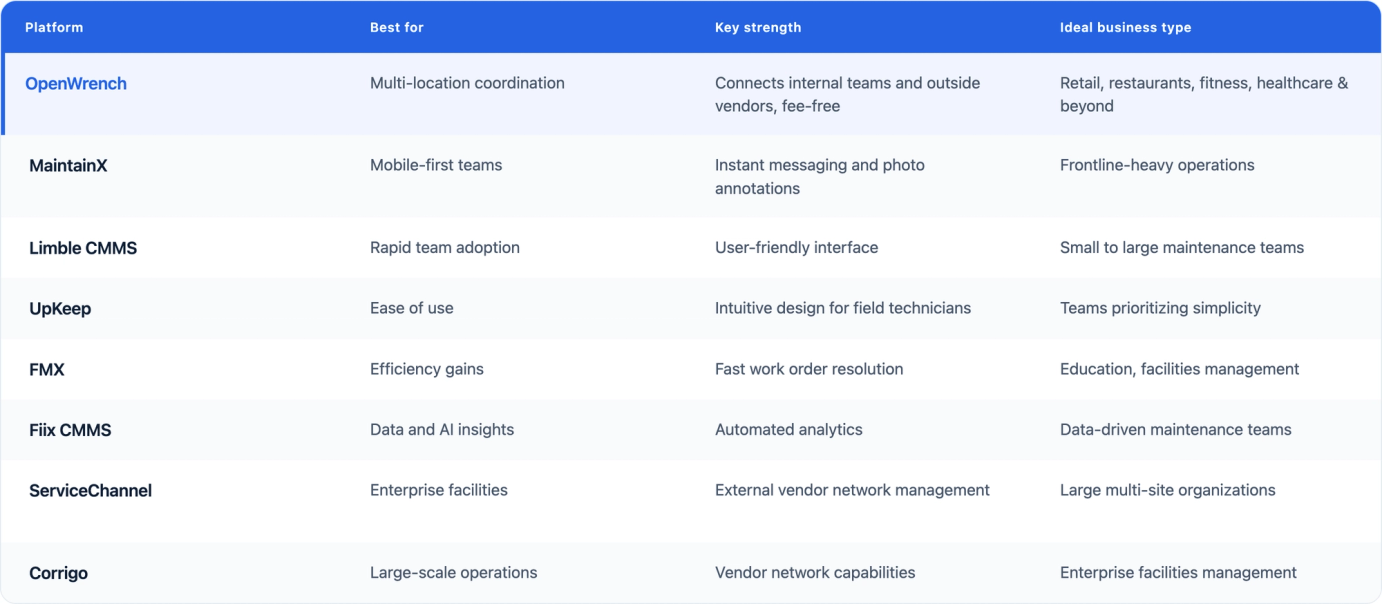
The platform that works best for you depends on your team structure, how many locations you manage, and whether you rely on in-house staff or outside contractors. Here's how the leading options compare.
OpenWrench
OpenWrench is designed specifically for multi-location businesses—think retail chains, fitness facilities, restaurants, and healthcare organizations. The platform brings internal teams and external vendors into one system, with real-time messaging that keeps everyone on the same page without the usual phone tag.
Operations leaders can track issues, manage planned maintenance, and monitor costs across every site from a single dashboard—which matters most when you're responsible for dozens or hundreds of locations and can't physically be at any of them.
Most platforms in this category were built for one of two things: managing internal technicians or connecting to a national contractor network. OpenWrench does both, and it doesn't charge vendors fees to participate—which means no markups buried in your invoices and no friction pushing contractors away from the platform. Every account gets a dedicated support contact, not a help desk queue.
The customer numbers bear this out. Pet Supermarket saved $467K annually after switching, including $95K from a single RFP process the platform made possible. Northland Properties replaced 25,102 phone calls and emails with in-app notes in one year and cut issue resolution time by 32%. Across OpenWrench's customer base, average work order cost has dropped 24.6% and the preventive maintenance ratio has climbed from 19% to 49%.
Reviewers tend to mention the same strengths: vendor dispatching, support, and cross-location visibility. One Director of Facilities, six years in, described OpenWrench as flexible and customizable with consistently exceptional support. A VP of Construction said every issue his team raised got addressed or improved.
It's especially well suited to a few verticals: see the deeper breakdowns of the best CMMS for gyms and fitness facilities, the best CMMS for restaurants, and the best CMMS for retail stores.
G2 rating: 4.8/5
Best for: Retail, restaurant, gym, and healthcare chains (roughly 20–1500 locations) that rely on outside vendors and want transparent costs without enterprise pricing or a months-long rollout.
MaintainX
MaintainX takes a mobile-first approach that resonates with teams whose technicians spend most of their day away from a desk. The app includes instant messaging, photo annotations, and AI-powered time estimates that help frontline workers stay productive in the field.
The platform covers the full CMMS stack—work orders, preventive maintenance, asset management, parts inventory, and reporting. G2 has ranked it #1 in CMMS for four consecutive quarters, with a 4.8/5 rating across more than 1,400 verified reviews.
Pricing starts at $25/user/month for the Essential plan, with Premium at $75/user/month. A free tier is available for very small teams. Inventory management and API access aren't included until the Premium tier, so teams that need to track parts or connect to another system face a significant price jump to get there.
The bigger limitation for multi-location operators: MaintainX is built around internal maintenance teams. Vendor coordination is lighter than purpose-built platforms, and multi-site reporting is gated to Enterprise pricing.
G2 rating: 4.8/5
Best for: Operations with in-house technicians who need a polished mobile tool and strong team communication.
Limble CMMS
Limble has built a reputation for being genuinely easy to learn. The platform offers robust asset management and preventive maintenance features while keeping the interface approachable enough that new users can get up to speed quickly.
It holds a 4.8/5 rating across 800+ verified G2 reviews and consistently leads the category on ease of use, quality of support, and likelihood to recommend. Pricing starts at $28/user/month for the Standard plan, with Premium+ at $69/user/month.
Limble was built for internal maintenance teams, and it shows. PM scheduling flexibility is strong, reporting is configurable, and the mobile app is fast. Businesses whose work flows primarily through outside contractors will find the vendor coordination side thinner than platforms built specifically for that workflow.
G2 rating: 4.8/5
Best for: Mid-sized organizations that want a full-featured CMMS with fast adoption and minimal implementation friction.
UpKeep
UpKeep puts simplicity first. The platform is built for field technicians who want to update work orders from their phones without navigating complicated menus or multi-step workflows.
It covers core CMMS functionality—work orders, preventive maintenance, asset tracking, inventory—starting at $20/user/month for the Essential plan. Inventory management and analytics come in at the Starter tier ($45/user/month), with Professional at $75/user/month for advanced reporting and request portals.
UpKeep holds a 4.5/5 rating on G2 across more than 1,090 reviews. Common complaints: analytics depth is gated behind higher tiers, custom dashboards are Enterprise-only, and per-user costs become a real issue as teams grow. Multi-site reporting and predictive features are either gated or sold separately.
G2 rating: 4.5/5
Best for: Small and mid-sized teams replacing paper or spreadsheet systems who need fast deployment and easy technician adoption.
FMX
FMX focuses on efficiency, and users frequently report faster work order resolution times after switching. It's particularly popular in education and facilities management, where the request intake flow is simple enough for non-maintenance staff—teachers, office managers—to submit and track tickets without training.
The platform includes a customer-facing portal for submitting requests, calendar-based preventive maintenance scheduling, asset tracking, inventory management, and reporting. FMX claims a 98% customer satisfaction rating and a 97% renewal rate. Pricing isn't published publicly.
Its G2 review volume is smaller than the other platforms in this list, which makes direct comparison harder. What the reviews show is consistent praise for implementation ease and customer support. The platform is less established in retail, restaurant, and fitness verticals compared to platforms built specifically for those use cases.
G2 rating: 4.8/5
Best for: Educational institutions, municipalities, and mid-sized facilities teams who need streamlined request intake and solid preventive maintenance scheduling.
Fiix CMMS
Fiix is built around data and analytics, with automated insights that help maintenance teams identify patterns and adjust maintenance schedules based on actual equipment behavior rather than fixed intervals.
Rockwell Automation acquired Fiix in 2021. The acquisition matters because Rockwell makes the Allen-Bradley PLCs running on a large share of North American factory floors—Fiix's IoT integration pathway is more credible than most CMMS vendors can offer. Connecting equipment sensor data to your work order system is achievable without months of custom development.
Pricing: Basic at $45/user/month, Professional at $75/user/month, Enterprise custom. A free plan is available but limited to a small number of users. Customer support response times have slowed since the acquisition, which shows up in reviews.
G2 rating: 4.6/5
Best for: Manufacturing and industrial operations that want predictive analytics and work within the Rockwell Automation ecosystem.
ServiceChannel
ServiceChannel is built for large enterprise organizations that run most of their maintenance through external contractors and who are less price sensitive. Its core strength is network access: ServiceChannel maintains relationships with thousands of vetted service providers across trades and geographies, which matters for a 1,000-location chain managing repairs in markets where they don't have established vendor relationships.
Work order management, PM scheduling, asset tracking, compliance documentation, and financial reporting are all built for enterprise scale.
The catch is the pricing model: ServiceChannel charges vendors fees to access the platform. That can create friction with contractors who don't want to pay to work with you, and can quietly drive up your effective maintenance costs. Implementation timelines are measured in months. The platform holds a 4.1/5 rating on G2 across 119 reviews, with ease of setup and ease of use both scoring below the category average.
G2 rating: 4.1/5
Best for: Large, less price-sensitive enterprise retailers and restaurant chains (500+ locations) with dedicated FM teams and the implementation resources to match.
Corrigo
Corrigo is owned by JLL, the global commercial real estate firm. That relationship shapes the product in both directions: Corrigo integrates tightly with JLL's broader facilities services, and its vendor network draws on JLL's contractor relationships. For organizations already using JLL for outsourced FM, it's a natural fit. For everyone else, it can feel like software built with someone else in mind.
It covers work order management, PM scheduling, asset tracking, and enterprise reporting. Corrigo holds a 4.5/5 rating on G2 across 133 reviews—higher than ServiceChannel on ease of use and quality of support. Pricing requires a custom quote.
G2 rating: 4.5/5
Best for: Large enterprise organizations already working with JLL for facilities management who want their software and service provider integrated.
Key benefits of work order management software
Faster repair response times
Automated routing and instant notifications get issues to the right person within minutes instead of hours. When a walk-in cooler fails at one of your locations, the system can immediately alert your preferred vendor with all the details they need to respond—though the cheapest fix is catching problems early through routine refrigeration maintenance.
Better vendor and team communication
Centralized messaging eliminates the back-and-forth of phone calls, voicemails, and scattered email chains. Everyone involved in a work order—requesters, technicians, vendors, managers—can see the same information and communicate in one thread.
Centralized asset and inventory tracking
The software maintains a complete history for each piece of equipment: past repairs, maintenance schedules, warranty information. This context helps technicians diagnose problems faster and helps you decide when replacement makes more sense than another repair.
Lower maintenance costs
Visibility into spending patterns reveals where costs can be reduced. You might find that one vendor consistently charges more than others, or that certain equipment types need replacement rather than continued repair.
Stronger compliance and audit trails
Every action in the system creates a timestamped record. When health inspectors or auditors ask for documentation, you can pull complete maintenance histories rather than reconstructing them from memory—which makes preparing for a health inspection far less of a scramble.
Data-driven reporting and insights
Dashboards and reports turn raw data into useful information. You can track response times, compare vendor performance, identify problem locations, and measure whether your maintenance program is improving.
Types of work order management systems
Basic work order software
Basic tools handle straightforward ticket tracking—someone submits a request, it gets assigned, it gets closed. They work for small teams with simple maintenance needs but typically lack asset management, preventive maintenance scheduling, or vendor coordination.
Computerized maintenance management systems
A CMMS goes beyond basic ticketing to include asset management, preventive maintenance scheduling, inventory tracking, and detailed reporting. Most of the platforms in this article fall into this category.
Field service management platforms
FSM platforms are designed for businesses that dispatch technicians to customer locations rather than maintaining their own facilities. They include scheduling, route optimization, invoicing, and customer communication features that facility-focused CMMS platforms typically don't prioritize.
Features to look for in work order software
Mobile app for frontline teams
Technicians rarely sit at desks. A well-designed mobile app lets them view assignments, update status, and attach photos from wherever they're working without returning to an office or logging into a computer.
Real-time messaging and notifications
Look for platforms that support messaging between requesters, technicians, and vendors within the work order itself, so conversations stay connected to the relevant context rather than scattered across email threads.
Asset and inventory management
Linking equipment to work orders creates valuable history over time. Tracking parts inventory helps prevent situations where a technician arrives on site only to find the part they need isn't available.
Vendor dispatch and coordination
If you work with external contractors, features for assigning work to vendors, tracking their performance, and managing service agreements become essential. This is especially true for multi-location businesses that rely on regional or national vendor networks.
Reporting dashboards and analytics
Customizable reports and KPI dashboards help you monitor what matters—response times, completion rates, costs by location, vendor performance. The best platforms make this data accessible without requiring technical expertise to pull it.
Customization and integrations
Platforms that let you tailor forms, fields, and processes to match how your team works tend to see better adoption. Integration with existing systems like accounting software prevents duplicate data entry.
How to choose the right work order software for your business
1. Map your current maintenance workflow
Before evaluating any software, document how maintenance requests currently flow through your organization. Where do requests come from? Who assigns work? What information gets captured? Identifying pain points helps you prioritize what the new system needs to solve.
2. Identify must-have features
Separate essential features from nice-to-haves. A restaurant chain coordinating external vendors has different priorities than a manufacturing plant with an internal maintenance team.
3. Compare pricing and total cost of ownership
Subscription fees tell only part of the story. Factor in implementation costs, training time, and ongoing support. A platform that costs more upfront but drives faster adoption might deliver better value than a cheaper option your team struggles to use.
4. Evaluate mobile and vendor support
If your technicians work in the field, test the mobile experience thoroughly. If you rely on external vendors, verify that the platform makes it easy to dispatch work and communicate with contractors.
5. Run a pilot with your frontline team
The people who will use the software daily are your best judges of whether it will actually work. A pilot reveals usability issues and adoption challenges before you've committed to a full rollout.
Simplify work order management with OpenWrench
OpenWrench brings communication, tracking, and vendor coordination together in one place for multi-location businesses managing internal teams, external vendors, and facilities across cities or regions.
Schedule a demo to explore how OpenWrench can simplify your maintenance management.
Frequently asked questions about work order management software
How much does work order management software cost?
Pricing varies widely based on features, number of users, and locations. Basic plans might start free or around $20-50 per user monthly, while enterprise solutions with advanced features often require custom quotes that can reach several thousand dollars monthly for large organizations.
Is there free work order management software available?
Several platforms offer free tiers with limited features, which can work for very small teams with basic needs. However, free versions typically restrict the number of users, work orders, or locations and lack capabilities like vendor management, advanced reporting, or integrations.
How long does it take to implement work order software?
Most cloud-based platforms can be operational within a few weeks, though the timeline depends on your organization's complexity. Simple setups might take days, while enterprises with multiple locations, custom workflows, and integrations might need several months for full deployment.
What is the difference between work order software and a CMMS?
Work order software focuses specifically on creating and tracking maintenance tasks. A CMMS includes work order management plus broader capabilities like asset tracking, preventive maintenance scheduling, inventory management, and detailed analytics—treating maintenance as a comprehensive program rather than just a task list.
Can work order software handle multi-location businesses?
Most modern platforms support multi-site operations with features for location-based reporting, centralized dashboards, and consistent workflows across all facilities. However, the depth of multi-location support varies between platforms, so this capability deserves careful evaluation if you manage many sites.