
Best Preventive Maintenance Software in 2026

Matt Velker
- Benefits of preventive maintenance software
- Key features to look for in preventive maintenance software
- The 10 best preventive maintenance software tools
- How to choose the right preventive maintenance software
- Preventive vs. predictive maintenance software
- How preventive maintenance software connects to a CMMS
- Simplify preventive maintenance with OpenWrench
- Frequently asked questions about preventive maintenance software
In This Post
Preventive maintenance is the discipline of servicing equipment on a regular schedule—before it fails—rather than waiting for a breakdown and scrambling to react. That schedule might be every 30 days, every 500 operating hours, or another trigger you define.
Most preventive maintenance software operates as part of a larger system called a CMMS, or computerized maintenance management system. The CMMS handles everything from work orders to inventory tracking, while the preventive maintenance aspect focuses specifically on scheduling and automating recurring tasks. In practice, three jobs sit at the core:
- Scheduling: The software creates and assigns maintenance tasks automatically based on time or usage.
- Tracking: Every completed task gets logged, building a detailed history for each piece of equipment.
- Alerting: Technicians receive notifications when maintenance is due or overdue.
Benefits of preventive maintenance software
The biggest advantage is straightforward: you catch small problems before they turn into expensive emergencies. When equipment fails unexpectedly, you're not just paying for the repair itself. You're also dealing with lost productivity, rush shipping for parts, and potentially overtime labor costs.
Routine upkeep almost always costs less than crisis management. In fast-paced industries like restaurants, this gap is stark—a walk-in cooler or fryer breakdown can run into the thousands and shut down service, which is exactly why a proactive approach to reducing restaurant maintenance costs pays for itself. For multi-location operators, a strong commercial kitchen maintenance plan is often the cheapest insurance you can buy.
Beyond the financial case, preventive maintenance software helps teams stay organized in ways that spreadsheets and paper systems simply can't. A centralized platform keeps everyone—site managers, technicians, vendors—looking at the same information. That alignment matters most when you're coordinating maintenance across multiple locations.
- Extended asset lifespan: Equipment that receives consistent care tends to last longer.
- Improved compliance: Documented maintenance history makes audits and inspections easier.
- Better resource planning: Predictable schedules allow for smarter staffing decisions.
- Reduced downtime: Proactive repairs mean fewer unexpected shutdowns.
Key features to look for in preventive maintenance software
Not every feature matters equally to every organization. A single facility with one maintenance technician has very different requirements than a restaurant chain managing 200 locations. Still, certain capabilities consistently separate effective platforms from the rest.
Automated PM scheduling
This is the feature that makes preventive maintenance software worth using in the first place. Look for platforms that support both calendar-based triggers (every 30 days) and meter-based triggers (every 500 operating hours). Once you set up a recurring task, the software handles the rest—creating work orders, assigning them to technicians, and tracking completion.
Work order management
Work orders are how maintenance tasks move from “scheduled” to “done.” Effective software lets you create, assign, and track work orders from start to finish, with real-time status updates so everyone can see who's working on what, how long tasks are taking, and where bottlenecks are forming.
Asset tracking and history
Every piece of equipment accumulates a maintenance history over time. Good software logs each asset's location, condition, and complete service record. This information becomes valuable when deciding whether to repair or replace aging equipment, and it helps explain why a particular machine keeps breaking down—especially for high-cost assets like commercial refrigeration units, where a well-documented service record pays off directly.
Mobile access for technicians
Field teams rarely sit at desks, so mobile access isn't optional—it's essential. Technicians need to check off tasks, attach photos, log updates, and access equipment manuals directly from their phones. If the mobile experience is clunky or slow, your team won't use the software consistently.
Vendor and contractor coordination
For businesses managing multiple locations, external service providers add a layer of complexity. The best platforms track vendor performance, manage invoices, and coordinate workflows across multiple contractors from a single dashboard. This feature becomes critical when you're overseeing maintenance at dozens or hundreds of sites.
Reporting and analytics
Data helps you improve over time. Look for customizable dashboards and the metrics that drive multi-location decisions—cost per site, spend trends, and vendor performance—along with the ability to spot patterns across your facilities. Good reporting turns raw maintenance data into insights you can actually act on.
Parts and inventory management
For operations running their own storeroom—especially in manufacturing and heavy-equipment settings—inventory features track stock levels, automate reordering, and link parts directly to work orders so a critical spare is never the thing holding up a repair. Multi-location retail, food service, and fitness teams that rely on outside vendors for repairs tend to lean on this less, since the parts live with the contractor rather than on-site.
The 10 best preventive maintenance software tools
Each platform below serves different organizational needs. Some prioritize simplicity, others scale, and still others focus on specific industries. The right choice depends on your team size, budget, and operational complexity.
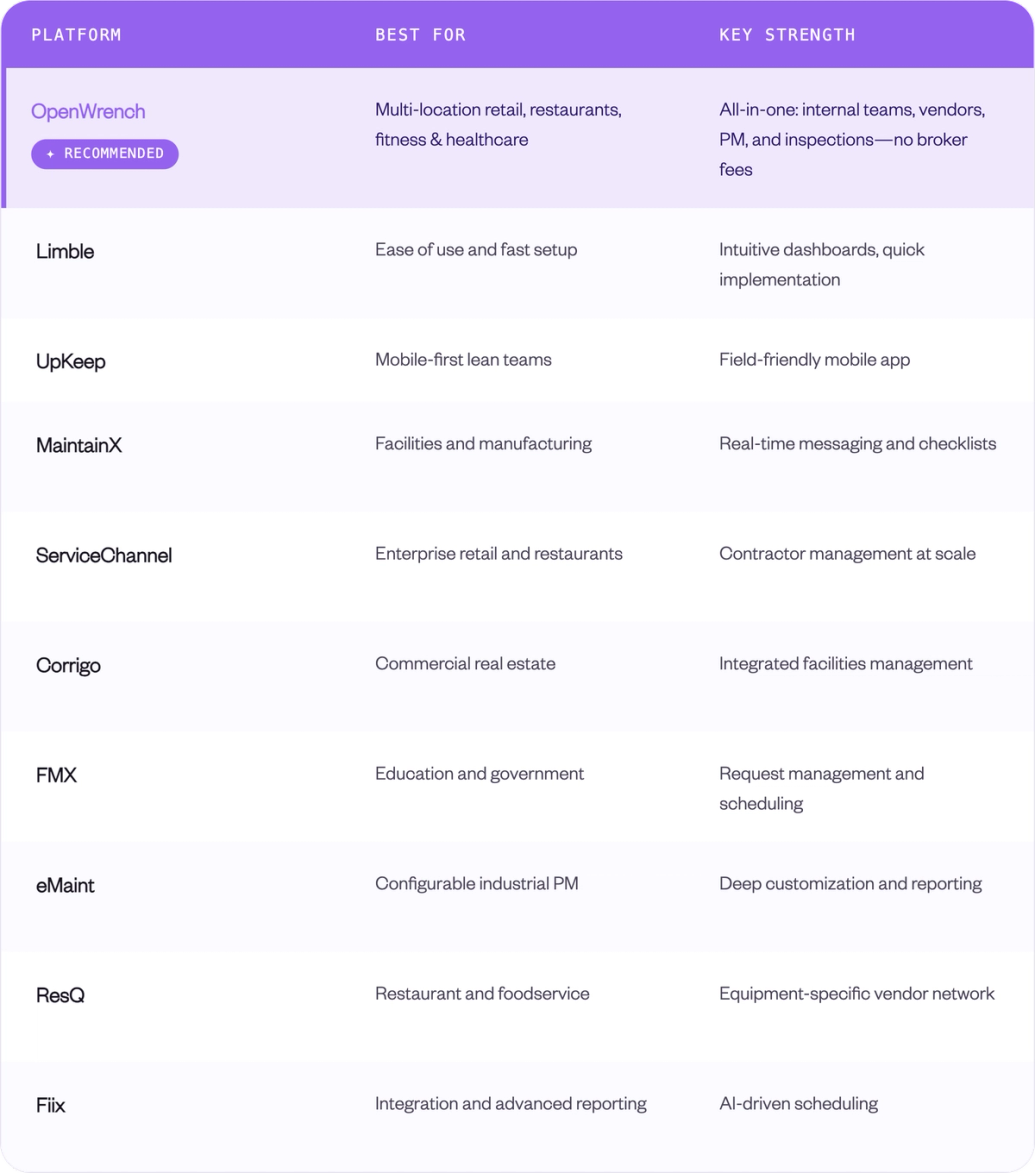
1. OpenWrench
OpenWrench is built specifically for multi-location businesses like retail chains, gyms, restaurants, and healthcare facilities. The platform centralizes communication between site managers, technicians, and vendors through real-time messaging and streamlined issue tracking, with planned maintenance, site inspections, and analytics working together to keep every location running smoothly.
What separates it from most tools on this list: OpenWrench handles both internal teams and outside vendors in one system, and it doesn't charge vendors fees or add markups to invoices. You keep direct vendor relationships and the savings that come with them, rather than paying a broker's cut.
The preventive maintenance impact is measurable. Across OpenWrench's customer base, the preventive maintenance ratio has climbed from 19% to 49% and average work order cost has dropped 24.6%. Pet Supermarket saved $467K annually after switching, including $95K from a single RFP process, and Northland Properties cut issue resolution time by 32%. For deeper industry breakdowns, see the guides to the best CMMS for restaurants, gyms, and retail stores.
G2 rating: 4.8/5
Pricing: Custom, based on location count. No per-vendor fees or invoice markups.
2. Limble
Limble earns consistently high marks for its intuitive interface and fast implementation. The cloud-based platform offers strong mobile capabilities and dashboards that don't require extensive training to understand, so teams looking for quick time-to-value often find it a good fit. It leads the category on G2 for ease of use and quality of support.
Limble is built around internal maintenance teams, so its PM scheduling and asset tools are excellent, while vendor coordination is lighter than platforms designed for contractor-heavy, multi-location operations.
G2 rating: 4.8/5
Pricing: Standard from $28/user/month; Premium+ at $69/user/month. Free trial available.
3. UpKeep
UpKeep targets smaller to mid-size operations that prioritize mobile access. Field workers can log assets, attach photos, and complete tasks entirely from their phones, and the platform keeps things simple without sacrificing the features most teams actually use.
The catch is that deeper analytics and custom dashboards sit behind higher tiers, and per-user pricing adds up as teams grow.
G2 rating: 4.5/5
Pricing: Essential from $20/user/month; Starter $45/user/month; Professional $75/user/month.
4. MaintainX
MaintainX serves facilities and manufacturing teams that rely on real-time communication. Digital checklists and standardized procedures help reduce unplanned downtime, while built-in messaging keeps everyone aligned without switching between apps. G2 has ranked it #1 in CMMS for several consecutive quarters.
Inventory management and API access require the Premium tier, and like Limble, MaintainX is built primarily for internal teams rather than external vendor coordination.
G2 rating: 4.8/5
Pricing: Free tier available; Essential $25/user/month; Premium $75/user/month.
5. ServiceChannel
ServiceChannel operates at enterprise scale, particularly for retail and restaurant chains managing large contractor networks. The platform excels at spend analytics and vendor performance tracking across hundreds of locations, drawing on a network of thousands of vetted service providers.
Two things to weigh: ServiceChannel charges vendors fees to access the platform, which can raise your effective costs, and implementation timelines run into months. It's calibrated for large enterprises rather than mid-market operators.
G2 rating: 4.1/5
Pricing: Custom enterprise quotes; vendor access fees apply separately.
6. Corrigo
Corrigo, owned by JLL, focuses on commercial facilities management with an integrated platform for service automation. Its contractor network and workflow tools suit organizations managing diverse property portfolios, especially those already using JLL for outsourced facilities services.
For organizations outside the JLL ecosystem, implementation is complex and pricing is enterprise-tier.
G2 rating: 4.5/5
Pricing: Custom enterprise quotes.
7. FMX
FMX has found a strong foothold in education and government sectors. The platform emphasizes user-friendly request management and maintenance scheduling without overwhelming complexity, and its intake flow is simple enough for non-maintenance staff to submit and track tickets without training.
It's less established in retail, restaurant, and fitness verticals, and pricing isn't published publicly.
G2 rating: 4.8/5
Pricing: Custom quotes; generally mid-market pricing.
8. eMaint
eMaint, owned by Fluke Corporation, is a 40-year-old CMMS built around asset reliability and preventive maintenance, with deep configurability as its defining feature. It supports calendar-based, meter-based, and event-triggered PM tasks, and ships with strong reporting out of the box—MTBF, MTTR, planned-versus-unplanned ratios, and cost-per-asset, all customizable without SQL knowledge.
The depth comes with a steeper learning curve, and the mobile app is less polished than UpKeep or Limble. It's strongest in manufacturing and industrial settings rather than multi-location retail or food service.
G2 rating: 4.4/5
Pricing: Team from $69/user/month (up to three users); Professional $85/user/month.
9. ResQ
ResQ specializes in restaurant and foodservice equipment, with more than 2,000 restaurants on the platform including chains like The Keg, KFC, and Tim Hortons. It understands the unique demands of commercial kitchen maintenance, from refrigeration units to cooking equipment, and reports reducing total repair-and-maintenance costs by 20–30% for the average restaurant.
ResQ leans on a marketplace of vetted trades, similar to a broker model, though it also lets you bring your own vendors. It has no public API, which can limit integrations for larger operations.
Pricing: Custom, based on needs.
10. Fiix
Fiix, backed by Rockwell Automation, appeals to organizations that want advanced reporting and enterprise integrations. AI-driven scheduling and connections to systems like SAP and Salesforce make it suitable for complex operational environments, and its Rockwell lineage gives it a credible IoT and condition-monitoring pathway.
The interface is less intuitive than newer competitors, and customer support response times have reportedly slowed since the acquisition.
G2 rating: 4.6/5
Pricing: Free plan (limited); Basic $45/user/month; Professional $75/user/month.
How to choose the right preventive maintenance software
Selecting preventive maintenance software isn't just about comparing feature lists. The most powerful platform in the world won't help if your team doesn't actually use it. Here's a practical approach to finding the right fit.
Step 1. Audit your current maintenance workflows
Before evaluating any software, take stock of what's working and what isn't in your current process. Where do communication breakdowns happen? What information gets lost between shifts? Which tasks consistently fall through the cracks? Understanding your pain points helps you prioritize features that will actually solve problems.
Step 2. Define your must-have features
Not every capability matters equally to every organization. A single-site manufacturer might prioritize asset tracking above everything else, while a multi-location retailer might focus on vendor coordination. Rank your requirements before you start comparing platforms.
Step 3. Compare pricing and scalability
Some platforms charge per user, others per location, and still others based on asset count. Consider both your current costs and where you expect to be in two or three years. A platform that seems affordable today might become expensive as you grow.
Step 4. Test mobile usability with your team
Get your actual technicians to trial the mobile experience. Software that looks great in a sales demo might frustrate users in the field. Adoption often succeeds or fails based on how the mobile app performs under real conditions.
Step 5. Evaluate support and onboarding
Implementation timelines vary dramatically between vendors. Ask about training resources, dedicated support contacts, and what happens when something goes wrong. The quality of ongoing support matters as much as the software itself.
Preventive vs. predictive maintenance software
These two terms often get confused, though they represent distinct approaches. Preventive maintenance follows scheduled intervals—you service equipment every 30 days or every 1,000 hours regardless of its current condition. The schedule is based on manufacturer recommendations or historical data about when things typically fail.
Predictive maintenance takes a different approach. Instead of following a fixed schedule, it uses sensors and real-time data to detect early warning signs of failure, so you only perform maintenance when the data suggests it's actually needed.
- Preventive maintenance: Time-based or usage-based scheduled tasks.
- Predictive maintenance: Condition-based monitoring using sensors and analytics.
Many modern CMMS platforms offer both. Preventive maintenance provides a reliable baseline; predictive maintenance can optimize that baseline over time as you gather more data about your specific equipment.
How preventive maintenance software connects to a CMMS
You'll often see “preventive maintenance software” and “CMMS” used interchangeably, though they're not quite the same thing. A CMMS is the broader system that manages all maintenance activities—reactive work orders, inventory, vendor relationships, and reporting. Preventive maintenance is typically one module within that larger system.
When evaluating software, consider whether you want a focused PM tool or a comprehensive CMMS. For most organizations managing multiple locations or complex operations, a full CMMS provides better long-term value because it handles both scheduled and unscheduled maintenance in one place.
Simplify preventive maintenance with OpenWrench
For multi-location businesses, maintaining consistent facility standards across every site presents a unique challenge. OpenWrench addresses this by centralizing communication, coordinating vendors, and providing visibility into maintenance activities across your entire portfolio—adapting to your workflows rather than forcing you into rigid processes.
Schedule a demo to explore how OpenWrench can simplify your maintenance management.
Frequently asked questions about preventive maintenance software
Is there a free preventive maintenance software option?
Some preventive maintenance software offers free tiers with limited features, typically restricting the number of users, assets, or work orders. Free versions can work for very small operations, though most growing businesses eventually require paid subscriptions for full functionality and adequate support.
How much does preventive maintenance software typically cost?
Pricing varies widely based on features, user count, and number of locations. Per-user plans often run $20-85 per user monthly, while enterprise contracts with custom implementations can reach thousands per month. Some platforms built for multi-location businesses price by location rather than per user. Always request detailed pricing that accounts for your specific scale.
Can preventive maintenance software support multi-location businesses?
Yes, many platforms are designed specifically for multi-site operations. These systems allow centralized oversight while enabling location-level management, reporting, and accountability. Look for features like location-based dashboards and cross-site analytics.
How long does it take to implement preventive maintenance software?
Simple preventive maintenance software setups with minimal customization can go live within a few weeks. Enterprise deployments with complex integrations, data migration, and extensive training might take several months. Ask vendors about typical timelines for organizations similar to yours.