
Invoice Approval Workflow for Multi-Location Brands

Katie Towler
- What is an invoice approval workflow?
- Why do billing errors slip through maintenance invoices?
- How should you set dollar thresholds for invoice approval tiers?
- Who should approve each tier?
- What should reviewers check on a lower-dollar invoice?
- What should reviewers weigh on a large invoice?
- How do you handle an invoice that fails review?
- How does software make invoice approval tiers easier to enforce?
- What are the most common invoice approval mistakes?
- Frequently asked questions
In This Post
An invoice approval workflow routes every service provider invoice through review tiers based on dollar amount, so billing errors get caught before payment goes out. For a multi-location brand, that means a $180 faucet repair and a $14,000 walk-in cooler replacement should never get the same level of scrutiny.
Most billing errors are ordinary. A duplicate invoice. A small repair billed at the full not-to-exceed (NTE) amount. A repair marked complete that doesn't hold. Spread those across 20 or more locations and hundreds of invoices a month, and small misses turn into real money.
This post covers how to set approval tiers, what each reviewer should weigh, and the mistakes that let errors slip through.
What is an invoice approval workflow?
An invoice approval workflow is the set of review steps an invoice passes through before it gets paid. In facilities maintenance, the workflow ties each invoice to its work order, confirms the work is complete and the price is within the approved quote or NTE limit, and sends the invoice to an approver based on the amount.
A tiered workflow gives small invoices a fast path and large invoices more eyes.
Why do billing errors slip through maintenance invoices?
Billing errors slip through because the invoice usually arrives separate from the work order. It shows up as an email attachment or a PDF, and the approver has to hunt for the quote, the completion notes, and the budget before deciding. Under time pressure, they approve what looks plausible.
The errors that get through most often are:
- Duplicate invoices for the same visit, submitted twice or by two people at the provider.
- Billing up to the NTE ceiling. A small job gets invoiced at the maximum the NTE allows because nobody asked whether the amount was fair.
- Work that's complete but poor. A work order marked complete doesn't mean the repair holds up.
- Big-ticket spend that doesn't fit the situation, such as a major repair on an aging asset or at a location with a lease about to end.
None of these take bad intent. They take a busy week and a review process that depends on memory.
How should you set dollar thresholds for invoice approval tiers?
Set your thresholds from your own invoice history. Pull the last 12 months of invoices, find the dollar range where most of them fall, and make that range your lowest tier so routine work moves quickly.
The tiers below are an illustration. Adjust the amounts to your average repair size and your spending authority.
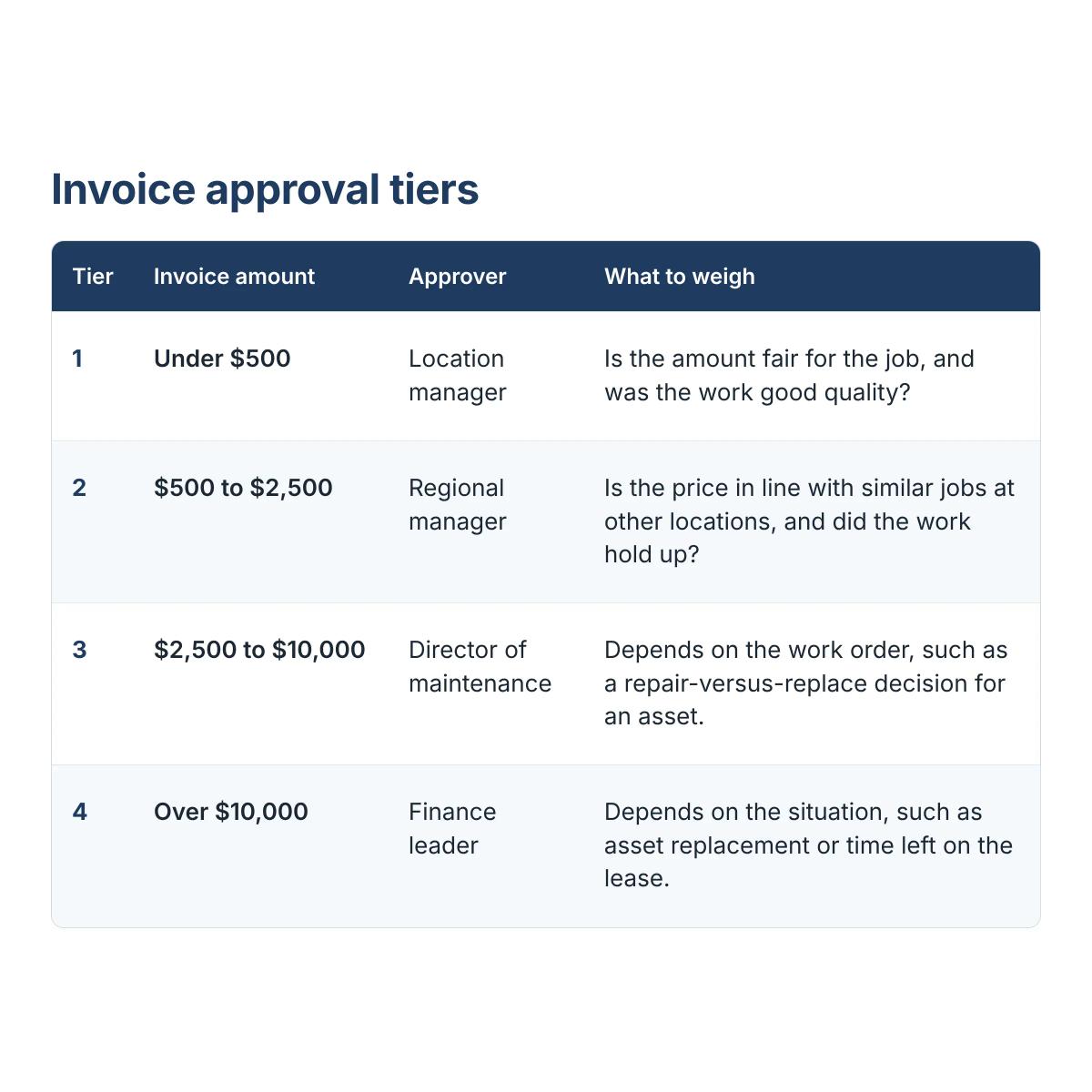
Completed work and a price at or below the approved quote or NTE should be conditions for submitting an invoice at all, so reviewers spend their time on judgment calls. Four tiers is a starting point. Brands with simpler spend can run two.
Who should approve each tier?
The right approver at each tier is the person best placed to judge what that tier is most likely to get wrong. Location managers can judge the quality of the work because they were there. Regional managers see pricing patterns across sites. Directors and finance leaders see asset age, total spend, and budget.
Put the person who can judge quality at the first tier and the person who can judge price across locations at the second. Larger invoices should reach someone who can weigh the full situation, which the sections below cover.
Name a backup for every approver. An invoice stuck in an out-of-office inbox is how late fees start.
What should reviewers check on a lower-dollar invoice?
Reviewers should check that the amount is reasonable and that the work was good. Completed work and a price at or below the quote or NTE are already conditions for invoicing, so the reviewer's job is judgment.
- Is the amount fair for the job? Watch for a small repair billed at the full NTE amount when the visit didn't take that long. An NTE is a ceiling, and the invoice should reflect the actual work.
- Was the work good quality? A work order marked complete doesn't mean the repair holds up. Check the photos and notes, and ask the location whether the problem is fixed.
A reviewer can answer both in a minute or two when the work order sits next to the invoice. They should also confirm that no other invoice exists for the same asset and visit.
What should reviewers weigh on a large invoice?
The right questions on a large invoice depend on the work order and the situation. Not every large repair involves an asset, so one fixed checklist doesn't fit.
- Asset replacement. When the invoice is for a piece of equipment, the reviewer makes a repair-versus-replace decision. Age, repair history, and the cost of repeat repairs show whether another large repair is money well spent.
- Building repairs. For major work on the property itself, time left on the lease matters. If you'll occupy the location for years, getting the repair done well makes sense. If the lease ends soon, you may be paying for a capital improvement on a property you won't occupy much longer.
How do you handle an invoice that fails review?
Send it back to the service provider with a specific reason, and keep that reason attached to the work order. A vague rejection ("please fix") starts a second round of email. A specific one ("this invoice bills the full NTE for a one-hour repair") usually gets a corrected invoice on the first try.
Set a response window with your service providers so a disputed invoice doesn't sit for weeks.
How does software make invoice approval tiers easier to enforce?
Software enforces approval tiers automatically, so the process doesn't depend on someone remembering the policy. In OpenWrench, a service provider can invoice only after the work order is complete and the price is at or below the approved quote or NTE. Approvers then review each invoice with the related work order and budget in view, invoices route by dollar amount, and approved invoices sync to accounting.
The service providers you already work with can join WrenchHub free, with no per-invoice fees, so the workflow doesn't require changing who does your repairs.
What are the most common invoice approval mistakes?
The most common mistakes are process gaps that look harmless until a few invoices go wrong.
- One approver for every invoice. A single reviewer becomes a bottleneck on small invoices and a weak check on large ones.
- Thresholds that never change. Review your tiers every quarter, because costs and spend patterns move.
- Approving without the work order. If the reviewer can't see the photos and notes, they can't judge quality.
- Applying the same checks to every invoice. Small invoices need a fairness and quality check. Large ones need a look at the asset or the property.
- Treating recurring invoices as automatic. Preventive maintenance (PM) invoices for HVAC and refrigeration can drift above the usual amount for months before anyone notices.
Frequently asked questions
How many approval tiers does a multi-location brand need?
Most multi-location brands do well with three or four tiers. Fewer tiers work when spend per invoice is consistent, and more tiers add review time without adding much protection.
How long should invoice approval take?
Pick a fixed window, such as five business days, and track it. Low-dollar invoices that go to one reviewer should clear much faster than that.
What should you do with a duplicate invoice?
Reject it and note the original invoice number and work order in the reason. Keeping the note on the work order helps the next reviewer catch a repeat.
How do you approve invoices for emergency work?
Pre-authorize emergency work up to an NTE limit, then run the final invoice through the normal tier for its amount. That keeps repairs moving without skipping the review.
Can we keep our current service providers?
Yes. Service providers you already work with can join WrenchHub free, with no per-invoice fees, and submit invoices in the app.